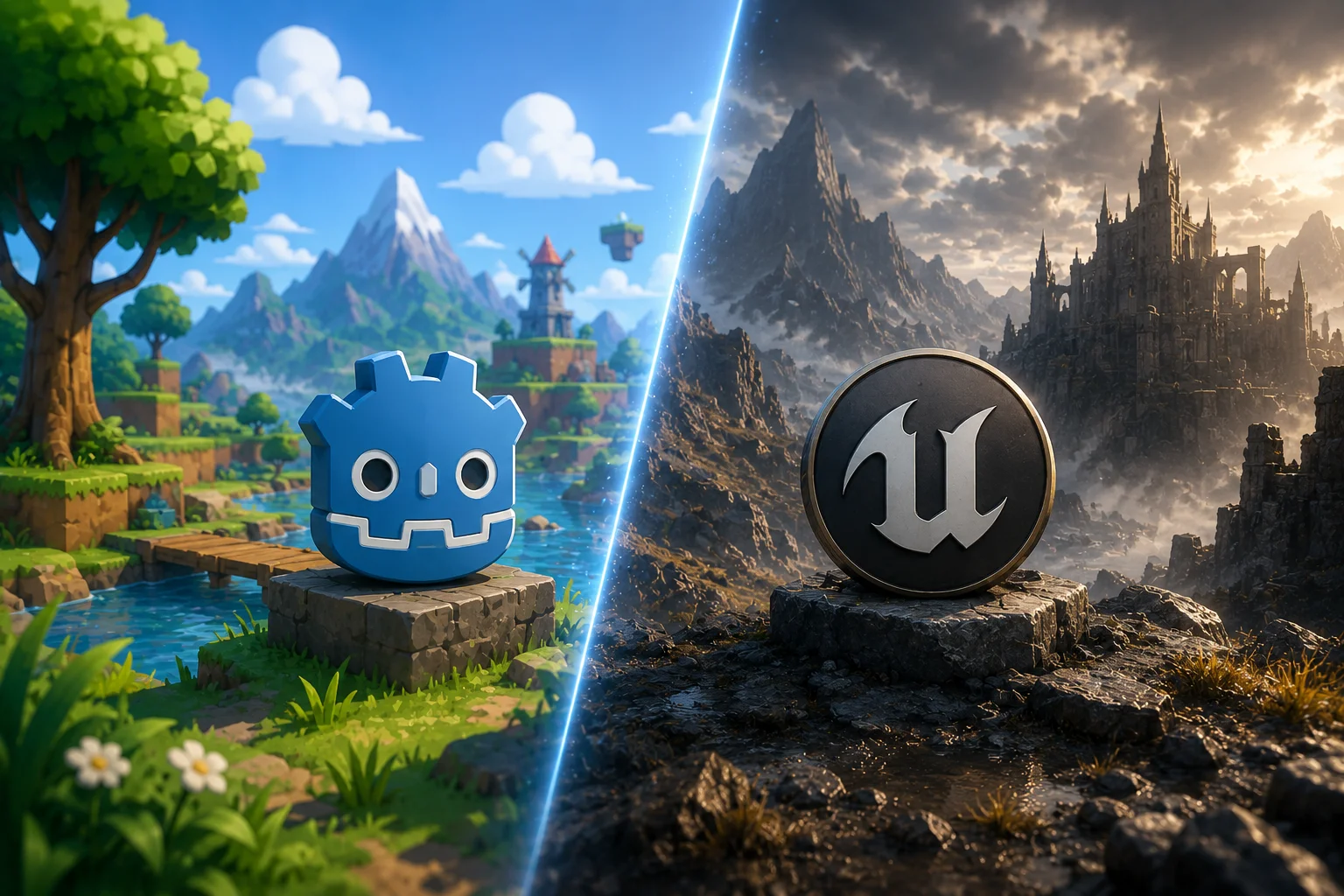

Most discussions around Unreal Engine vs Godot start with features. The problem is that engine decisions are rarely made that way. Like any game engine comparison, the answer depends on more than a feature list. We’ll get through all the tech details and beyond to help you make a well informed decision.
Overview of Godot and Unreal Engine
Godot and Unreal Engine come from very different backgrounds.
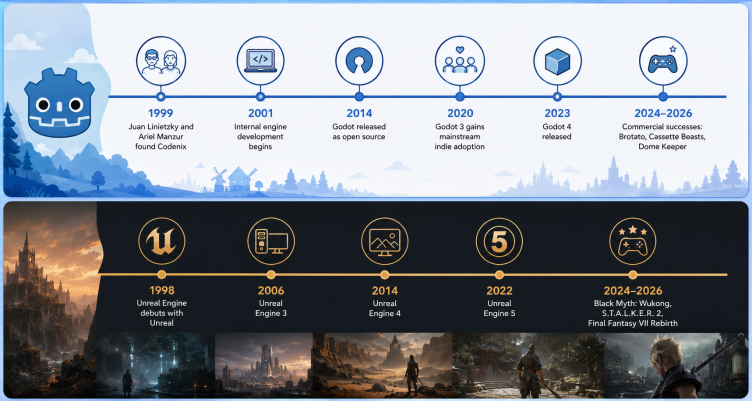
Godot is an open-source game engine. Two Argentinian software developers Juan Linietzky and Ariel Manzur created it for the internal use of their small company. In 2014, they decided to make it available for larger public. It is maintained by a community of contributors and can be used without licensing fees or royalties. It has become one of the most discussed indie game development engines in recent years.
Unreal Engine was created by Epic Games in the 90s and has been part of commercial game development for more than 25 years. The engine has become one of the most widely used AAA game engines in the industry.
Godot and Unreal usually enter the conversation at very different moments. Unreal usually comes up in projects where visuals, console releases, or larger production teams are part of the plan.
Godot shows up in very different conversations. Sometimes it’s an indie team. Sometimes it’s a prototype. Sometimes it’s a commercial project that simply doesn’t need everything a larger engine brings with it. At the same time, plenty of projects that might have defaulted to Unreal a few years ago are at least taking a look at Godot before making a decision. It’s no longer unusual to see teams seriously evaluating both engines at the beginning. That’s one reason a Godot engine comparison appears so often during early planning stages.
At the end, it all comes up to how the team wants to build the game. Some prefer having more control over the technology. Others would rather work inside a larger ecosystem with more tools already available.
| Category | Godot | Unreal Engine |
| License | Open-source | Proprietary |
| Cost | Free | Royalty model |
| Typical Users | Indie developers, small teams | Mid-size to AAA studios |
| Engine Size | Lightweight | Larger ecosystem |
| Source Code Access | Full access | Limited by Epic ecosystem |
| Learning Curve | Easier | Steeper |
| Community | Growing rapidly | Larger and more established |
Key Differences Between Godot and Unreal Engine
When it comes to differences that matter for developers, it’s not something that can be easily put in numbers as when choosing a phone’s characteristics. Let’s take a closer look at all the factors that affect the choice: performance, ease of use, and deployment options.
Performance and Rendering Capabilities
When discussing Godot vs Unreal Engine performance, developers are usually talking about very different types of projects. The first thing many developers notice about Unreal is how much visual technology is already there. Lighting, rendering, materials, large environments – a lot of it is built into the engine from the start. That’s one reason Unreal shows up so often in console and AAA production.
Godot tends to show its strengths in a different place. Godot also gives developers a different relationship with the engine itself. Developers aren’t limited to the tools in front of them – they can explore, modify, and build on top of the engine itself if the project requires it.
That approach has attracted a community that tends to be unusually involved in the technology they’re building with.
That level of access is unusual among modern game engines and has become one of the characteristics many developers associate with Godot. But for teams that do, it’s often one of the reasons Godot ends up on the shortlist in the first place. Some teams want more technology available from the start. Others would rather add things only when they actually need them.
| Area | Godot | Unreal Engine |
| 2D Development | Strong | Good |
| Stylized Games | Strong | Strong |
| Photorealistic Graphics | Limited adoption | Industry standard |
| Large Open Worlds | Possible | Common |
| High-End Rendering Tools | Basic to moderate | Extensive |
| Console AAA Production | Rare | Common |
Ease of Use and Learning Curve
This is often where developers make up their minds surprisingly quickly. Some developers open Godot for the first time and feel productive almost immediately. The editor is relatively lightweight, the structure is easy to understand, and there is less happening on screen at once.
Unreal tends to be the opposite experience. The engine exposes more systems, more tools, and more settings from the beginning.
That can feel overwhelming early on, but teams working on larger productions often see it differently. One reason Unreal remains common in larger productions is that a lot of the supporting systems are already part of the environment. Teams working on console releases, multiplayer projects, or larger productions often run into tools they eventually need anyway.
Why is Godot so much easier? The engine is smaller, open-source, and easier to modify directly. That tends to matter most when teams want more control over the technology they’re building on.
Supported Platforms and Deployment Options
Both engines function as a cross-platform game engine, supporting mobile, PC, and console development.
The difference usually appears later. As projects expand across platforms, teams start dealing with optimization, certification, platform-specific features, and deployment workflows. How much of that is already built into the engine – and how much needs to be handled separately – becomes part of the conversation.
Looking at platform support alone doesn’t tell you much, though. Both engines can reach the same destinations. The difference is usually in how teams choose to get there. By that point, the decision has usually been influenced by the team, workflow, and production goals long before release enters the discussion.
Godot vs Unreal Engine by Use Case
Best for Indie and Small Teams
Most conversations about Godot vs Unreal Engine for indie games focus on workflow rather than features. A lot of smaller teams end up looking at Godot simply because they can get started quickly.
The engine doesn’t ask for much upfront. You download it, open a project, and start building. For a solo developer or a small team, that matters more than people sometimes admit.
That’s not to say Unreal never appears in indie development. It does. But Godot often attracts teams that want to spend less time dealing with the engine and more time working on the game itself.
Best for AAA and High-End 3D Projects
The discussion around Godot vs Unreal Engine for 3D game development often starts here. Walk through the credits of enough large console games and Unreal starts appearing again and again.
Part of that is history. The engine has spent years inside larger productions, so many teams already know how to build around it. Artists know the workflows, engineers know the tools, producers know what to expect.
Once a project grows into hundreds of people, multiple platforms, and years of development, those things start carrying real weight.
Best for Mobile and Cross-Platform Development
Mobile projects are one of the few areas where both engines appear regularly, but often in very different types of production.
A smaller mobile game, a prototype, or a lightweight commercial project might be built in Godot. At the same time, larger productions that share assets, systems, or teams with PC and console versions often end up in Unreal.
Cross-platform projects make the comparison even less predictable. Two studios can target exactly the same platforms and still arrive at different engine choices depending on how the game is being produced behind the scenes.
By the time deployment becomes part of the discussion, the engine has usually been chosen for reasons that have very little to do with the platform list itself.
| Scenario | Godot | Unreal |
| First game | ✓ | |
| Solo developer | ✓ | |
| Small indie team | ✓ | |
| Stylized 2D project | ✓ | |
| Mobile game | ✓ | ✓ |
| Multiplayer game | ✓ | |
| Console release | ✓ | |
| AAA production | ✓ | |
| Open-world project | ✓ | |
| High-end graphics | ✓ |
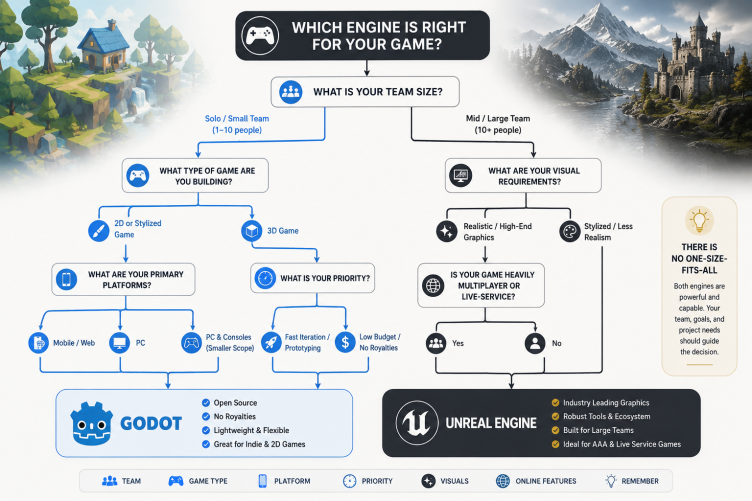
Cost, Licensing, and Community Support Comparison
A lot of comparisons between Godot and Unreal eventually end up in the same place: money, licensing, and what happens when the team gets stuck.
Not because these are the most exciting topics, but because they’re the ones developers keep dealing with throughout production.
| Factor | Godot | Unreal Engine |
| Upfront Cost | Free | Free |
| Source Code Access | Full access | Access available through Epic ecosystem |
| Royalties | None | Revenue-based royalty model |
| Marketplace Ecosystem | Smaller | Extensive |
| Community Size | Growing rapidly | Larger and more established |
| Third-Party Resources | Moderate | Extensive |
| Learning Resources | Community-driven | Community-driven + commercial ecosystem |
Cost
Among modern free game development engines, Godot has one of the simplest licensing models. The engine is free to use, free to modify, and free to distribute with commercial projects. There are no royalties to calculate later and no licensing discussions once the game starts generating revenue.
Unreal takes a different approach. Most teams can start using it without paying anything, but commercial success eventually brings licensing considerations into the conversation. Games with gross revenue under $1mln don’t pay anything. For revenue over $1mln, 5% of it belongs to Unreal. That means that with revenue of $2mln, game publisher has to pay $50,000.
Whether that matters depends on the project. For some teams it’s irrelevant. For others it’s part of the business calculation from the beginning.
Community and Ecosystem
Unreal has been part of commercial game development for a long time, and that history shows up everywhere. Documentation, tutorials, marketplace assets, plugins, conference talks, production breakdowns – there is a huge amount of material built around the engine.
Godot feels different. Its community is smaller and feels more hands-on. A lot of the discussion revolves around improving the engine, building tools, and solving problems directly rather than working entirely through third-party resources.
Which One Matters More?
This is usually where priorities start to diverge. Some teams care most about licensing flexibility and direct control over the technology. Others care more about access to existing tools, assets, production workflows, and a larger ecosystem. Neither approach is automatically better. They simply solve different problems.
Examples Of Games Made in Godot and Unreal
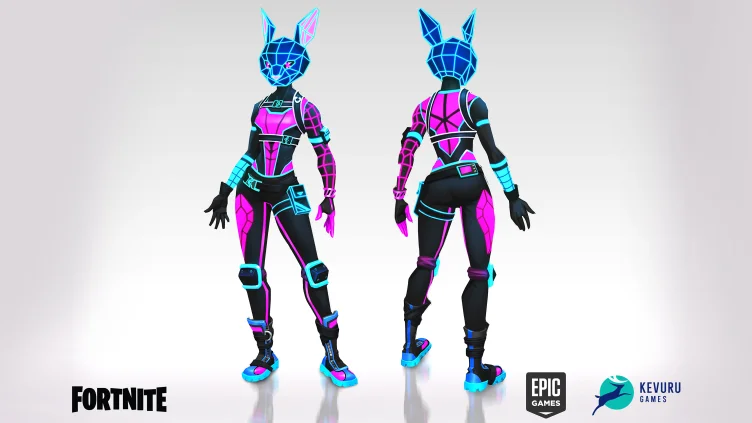
It’s easy to give an example of a game made with Unreal Engine. You can go through a list of famous games that everybody knows and chances are that most of them were created with Unreal. S.T.A.L.K.E.R., Final Fantasy VII Rebirth, Hogwarts Legacy… When we worked as an outsource team with Fortnite, we knew that the art had to be integrated into Unreal Engine.
However, it’s not just AAA titles. Indie games like Manor Lords or Stray were also made with Unreal. So, it’s not only for major releases.
Similarly, Godot is not reserved exclusively for experimental hobby projects. Games made with Godot can be successful. Here are some examples: Brotato, a highly replayable action game with simple visuals and addictive gameplay loops, sold over 5mln copies. The variety of genres is huge: RPG Cassette Beasts, survival strategy Dome Keeper.
And then there are games like Sonic Colors: Ultimate. It wasn’t built entirely in Godot, but used Godot for parts of the remaster pipeline. That may not sound as impressive as a full commercial release, but it shows something equally important – developers are willing to bring Godot into established production environments when it solves a specific problem efficiently. For an engine that many people still associate primarily with indie development, that’s a noteworthy signal of how far its adoption has expanded.
Final Verdict: Which Engine Is Better for Your Project?
By this point, the answer is probably already becoming clear.
Godot and Unreal are often compared as direct competitors, but many teams arrive at them for completely different reasons. One project starts with Godot because the team wants something lightweight and flexible. Another starts with Unreal because console releases, advanced visuals, or larger production requirements are already part of the plan.
As Mykhailo Kravets, gameplay mechanics expert at Kevuru Games says, “There is no such thing as the best game engine really. In our experience of working on big projects with top companies, they typically use Unreal, but good developers shouldn’t limit themselves to a few selected tools. If tomorrow a client who works in Godot comes to us, the project will be as interesting for us as any other.”
Most teams don’t choose an engine in isolation. They choose it alongside a project, a timeline, a budget, and a production plan. Change any of those, and the answer can change too. Both can end up making the right decision while choosing different engines.
The same thing happens with experience. Some developers prefer having direct access to the engine and a smaller toolset. Others would rather work inside a larger ecosystem where many of those systems already exist before production starts.
Looking at the industry today, neither choice feels unusual anymore. It’s one reason the same Unreal Engine comparison can lead different teams to completely different decisions.
Curious to learn more about game engines? Read our article on Unreal vs Unity.
FAQ
What is the main difference between Godot and Unreal Engine?
Godot gives developers a smaller, more lightweight environment to work in. Unreal gives them a much larger one.
A lot of the differences people talk about – graphics, tooling, workflow, team size, production scale – tend to grow from that starting point. That’s why the choice often feels obvious to some teams and completely wrong to others.
Is Godot Better Than Unreal Engine for Indie Game Development?
A lot of indie developers would probably answer “sometimes.” Godot appears frequently in smaller projects because it’s free, and stays relatively lightweight and straightforward. Unreal shows up in indie development too, especially when teams are aiming for more demanding visuals or already have experience with the engine.
Looking at recent indie releases, it’s easy to find successful games built with both. The decision often comes down to the project itself rather than the indie label attached to it.
A lot depends on the game being made. A small 2D project, a stylized indie title, and a multiplayer indie game can all end up making different engine choices for completely valid reasons.
Which Engine Is Better for AAA Game Development?
Most developers wouldn’t start a AAA project by comparing Godot and Unreal on a feature list.
The conversation usually happens much earlier – around team experience, production pipelines, existing tools, and the kind of game being built. By the time a project reaches AAA scale, many of those decisions have already been made.
That’s one reason Unreal appears so often in larger productions. A lot of teams working on those projects already know the engine, already have workflows built around it, and already have people who have shipped games with it before.
Does Unreal Engine Provide Better Graphics Than Godot?
If you spend enough time looking at game credits, Unreal starts showing up repeatedly in projects that put a lot of emphasis on presentation.
That doesn’t automatically tell you anything about Godot. It mostly reflects where each engine has spent most of its time over the years.
One has been heavily present in large console and PC productions. The other has become popular in a very different part of the industry.
As a result, the games most people associate with Godot and Unreal often have very little in common with each other.
Is Godot Completely Free for Commercial Use?
Yes. You can build and sell commercial games with Godot without paying licensing fees or engine royalties.
The engine is also open-source, which means developers have access to the code itself rather than working entirely inside a closed ecosystem. For some teams that’s a major advantage, for others it’s simply nice to have.
For many projects, that may never become a deciding factor. But for teams that want complete ownership over their technology stack and licensing model, it’s often part of the appeal.
Which Engine Is Easier to Learn for Beginners?
Godot is often the engine newcomers try first, and one of the reasons is indeed that it is easier to learn. Some other reasons are community discussions and lots of tutorials, which make it more accessible alltogether (and don’t forget about free access).
How Do I Choose Between Godot and Unreal Engine for My Game?
| Project Characteristic | Godot Often Fits Better | Unreal Often Fits Better |
| Game Type | 2D games, indie titles, prototypes, stylized projects | High-end 3D games, open worlds, AAA production |
| Target Platforms | Mobile, PC, web, smaller console releases | PC, PlayStation, Xbox, large cross-platform launches |
| Team Size | Solo developers and small teams | Mid-sized and large production teams |
| Visual Requirements | Stylized visuals, gameplay-first projects | Realistic graphics and advanced rendering |
| Online Features | Smaller multiplayer projects | Large multiplayer and live-service games |
| Development Timeline | Shorter production cycles | Long-term development and larger roadmaps |
The table can help narrow the choice, but most projects don’t fit perfectly into either column.A small team can build a successful game in Unreal. A larger studio can successfully use Godot. In many cases, the final decision comes down to the team’s experience, workflow preferences, and making sure everyone is comfortable working with the same technology stack before production begins.